
Manual
Video Cloud workflows
Integrate Live WebRTC signaling and upload, browse, delete, and play encrypted stored video.
Live WebRTC signaling
- The app calls the HTTPS ICE API through the RTK SDK.
- The app's platform WebRTC component creates the SDP offer.
- The RTK SDK creates the signaling session over HTTPS.
- The cloud sends
webrtc_offerthrough the current device owner's MQTT or WebSocket transport. - Device SDK or firmware receives the offer, attaches camera and audio tracks, and creates an answer.
- The device submits the answer through the HTTPS answer API.
- The app retrieves the answer through the RTK SDK and completes media negotiation.
- The app or device closes the session.
Validate close, expiry, timeout, offline, busy, and unsupported-capability states. Signaling delivery does not fan out and does not automatically fall back to a non-owner transport. The cloud coordinates signaling but does not receive or store Live media frames. A Live WebRTC session never becomes a Stored Clip automatically.
Direct device upload
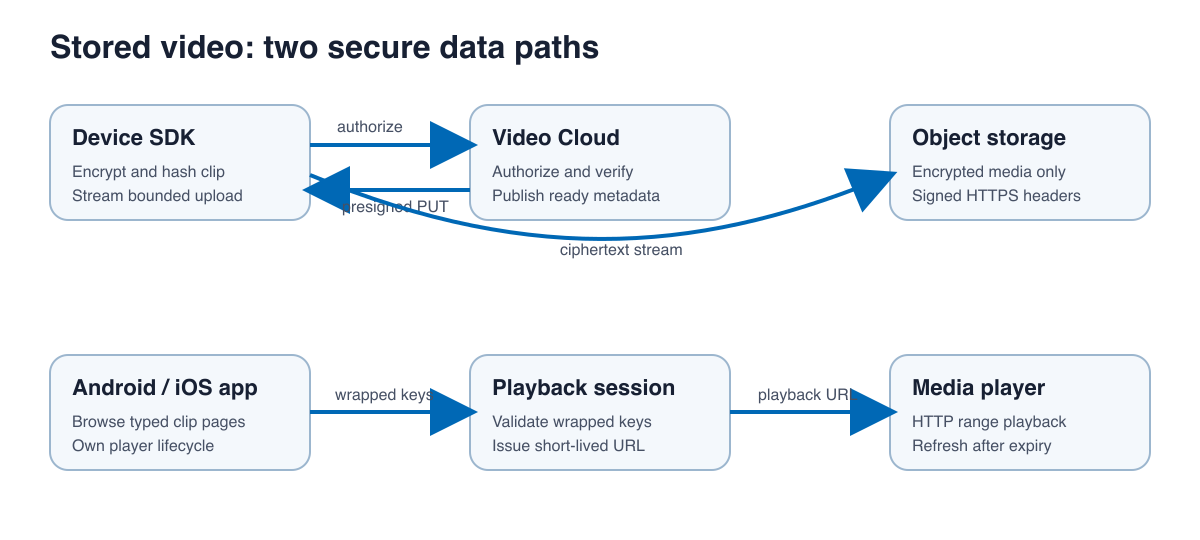
- Finish recording a complete MP4 and encrypt the stored bytes.
- Calculate the ciphertext size and base64 SHA-256 required by the service contract.
- Create the versioned encryption descriptor and wrapped
clipkeymetadata. - Authorize with
POST /v1/devices/{device_id}/clip-uploadsthrough the native SDK. - Copy every returned signed header and PUT only encrypted bytes to the HTTPS presigned URL.
- Complete the upload through the SDK.
- Poll upload state until
ready,failed, orexpired.
The native streaming PUT accepts a rewindable read callback, an exact body size, an optional progress callback, an optional cancellation check, and a configurable bounded buffer. The default implementation uses a small buffer suitable for memory-constrained devices. A zero-byte read before the declared body size is a protocol failure.
Current technical defaults are 256 MiB for MP4 clips, 5 MiB for JPEG snapshots, 10 minutes for signed URLs, and 30 minutes for an upload lifecycle. Retention profiles are deployment-configurable at 1, 7, or 30 days. These values are not pricing, backup, region, quota, or SLA commitments.
Browser pagination
Android listClips and iOS listClips return typed ClipPage values. Start with skip = 0 and a positive limit, display ClipSummary values, and request nextSkip until it is absent. Filters can include device, event type, and time range. Handle an empty page as a normal state.
Thumbnails and deletion
Use downloadThumbnail rather than composing download paths in application code. Decode image bytes outside the main thread and apply an application cache policy that does not expose credentials. Confirm user intent before deleteClip; deletion removes cloud metadata and media according to service policy and should not be retried blindly.
Playback sessions
- Select a typed clip summary.
- For encrypted media, ask
PlaybackKeyProviderto prepare wrapped material using the active server playback key. - Call
createPlaybackSessionwith the device, clip, bearer token, and wrapped fields. - Give the returned short-lived range-capable URL to Media3/ExoPlayer or AVPlayer.
- Refresh the session when it expires instead of persisting the URL.
The player belongs to the application. Release Android player instances with the screen lifecycle and replace the iOS player item when selecting another clip. Treat 401/403 as authentication or authorization failures, 404 as a stale/deleted clip, and an expired playback URL as a request for a new session.
Legacy behavior
uploadClip and /upload_clip remain for source compatibility with pre-cutover deployments. Direct-upload-enabled servers return 410 for clip media. New device integrations must use authorize, presigned PUT, complete, and status operations. Snapshot upload remains a separate supported compatibility path.
Current release boundary
The current release does not bundle server-side transcoding, S3 multipart upload, simulcast negotiation, renegotiation, or a complete in-SDK WebRTC media renderer.